● THE RECRUITING JOURNAL EST. 2025
Scouted.
A recruiting organizer, for their pocket.

Your kid's
recruiting shouldn't live
in a Notes app.

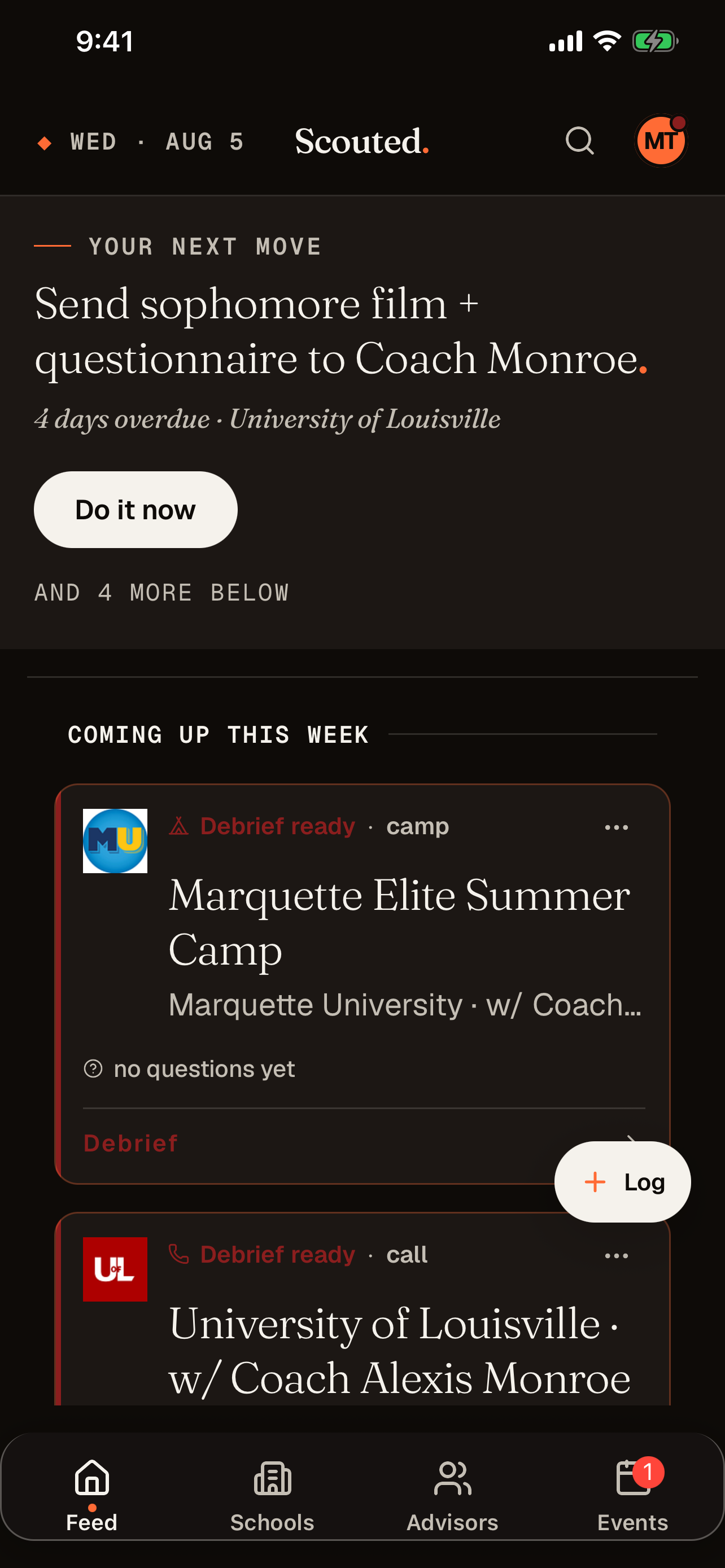
College recruiting means coach emails, camp invites, "keep in touch" replies, half-remembered visit dates, and screenshots that live in the camera roll forever. Scouted puts every school, every conversation, and every decision in one place. It opens on one next move, not a wall of cards. Your athlete can focus on their game.

↓  Opens your Messages app pre-filled. Send it from your phone, in one tap, or show the QR.
Free forever up to 4 schools
Pro $4.99/mo · or $49.99/yr · 1-week free trial
Built by a recruiting dad
Before After
Scouted feed
"She just shows me." The parent app for the recruiting class.
Field Note № 01 · The Shift

From spreadsheet chaos,
into a quiet dashboard.

Most recruiting journeys start on a spreadsheet. Ours did too. It gets color-coded, then half-abandoned, and then impossible to keep current when a coach replies at 10:41 p.m. on a Tuesday. Scouted is what that spreadsheet wanted to be. It lives on your athlete's phone and stays current.

The old way
Spreadsheet + sticky notes
School Coach ?? Last Contact Status
Indiana Miller?? or Millar 3/12 (check email) interested??
Duke Thompson 3/29 sent film
Stanford Davis ?? April camp?? REPLY!!
Iowa St. Garcia 7/7 visit moved · aug?
Ohio · ? · 2/14 cold
rest of list in Notes app + screenshots folder
where is camp $$?
→
The Scouted way
Everything in one place
— YOUR ROSTER · 15 SCHOOLS
15 schools, in order.
triage is half the job. keep the warm ones warm.
RECENT · 2 AGING · 4 COLD · 2
PULSE →
Evaluated.
2 SCHOOLS
Wake Forest University
D1 FBS · Atlantic Coast Conference
Follow-up completed · 13d ago
EVALUATED
UCLA
D1 FBS · Big Ten Conference
Quiet for 25 days
TALKING
Talking.
7 SCHOOLS
Boise State
D1 FBS · Mountain West
TALKING
Field Note № 02 · What It Notices

A journal that
watches the room.

A spreadsheet only remembers what you typed. Scouted reads what your athlete logs (calls, texts, coach emails, notes) and pulls out the camps, visits, and follow-ups buried in paragraph four. It notices who's gone quiet, and it keeps a one-line summary of each relationship at the top of every school.

Exhibit A · From a call you logged
CALL LOG · WAKE FOREST · 16D AGO
"Talked w/ Coach Whitmore for ~25 min. Said they'd love to see me at the Perfect Game Championships in Fort Myers, July 14–16. Asked me to send a fresh senior-year highlight reel before then."
Surfaced on the school timeline →
Smart suggestion · From your call note

Add camp "PG Championships, July 14."

Confidence: high · Source: your call · Adopt or dismiss
Exhibit B · From the silence
PULSE · COLD · STANFORD
No contact with Stanford in 52 days. Their average reply cadence on this thread runs around 4 days. Engagement-period pressure peaks now.
Tagged on your roster →
Pulse · Going cold

Stanford has gone quiet.

Last contact 52d ago · Tap into Pulse
Exhibit C · From the dossier
DOSSIER · WAKE FOREST UNIVERSITY
You've visited Wake Forest, impressed Pitching Coach Evan Stokes and Head Coach Jake Whitmore with your left-handed velocity and slider consistency, and they're actively following your progress while you've kept in monthly contact and sent recent film. Tap to expand.
Headline of every school detail →
Vibe line · One sentence

The whole relationship, in one sentence.

Updated 20w ago · Refreshes on new contact
Personalized · No chatbot Scouted's smart suggestions appear in your feed. The dossier sits at the top of every school detail. The pulse tags every school on your roster as recent, aging, or cold. You can turn any of it off. Included on Standard and Pro. See pricing →
Field Note № 03 · The Prep Ritual

Walk in prepared.
Walk out with answers.

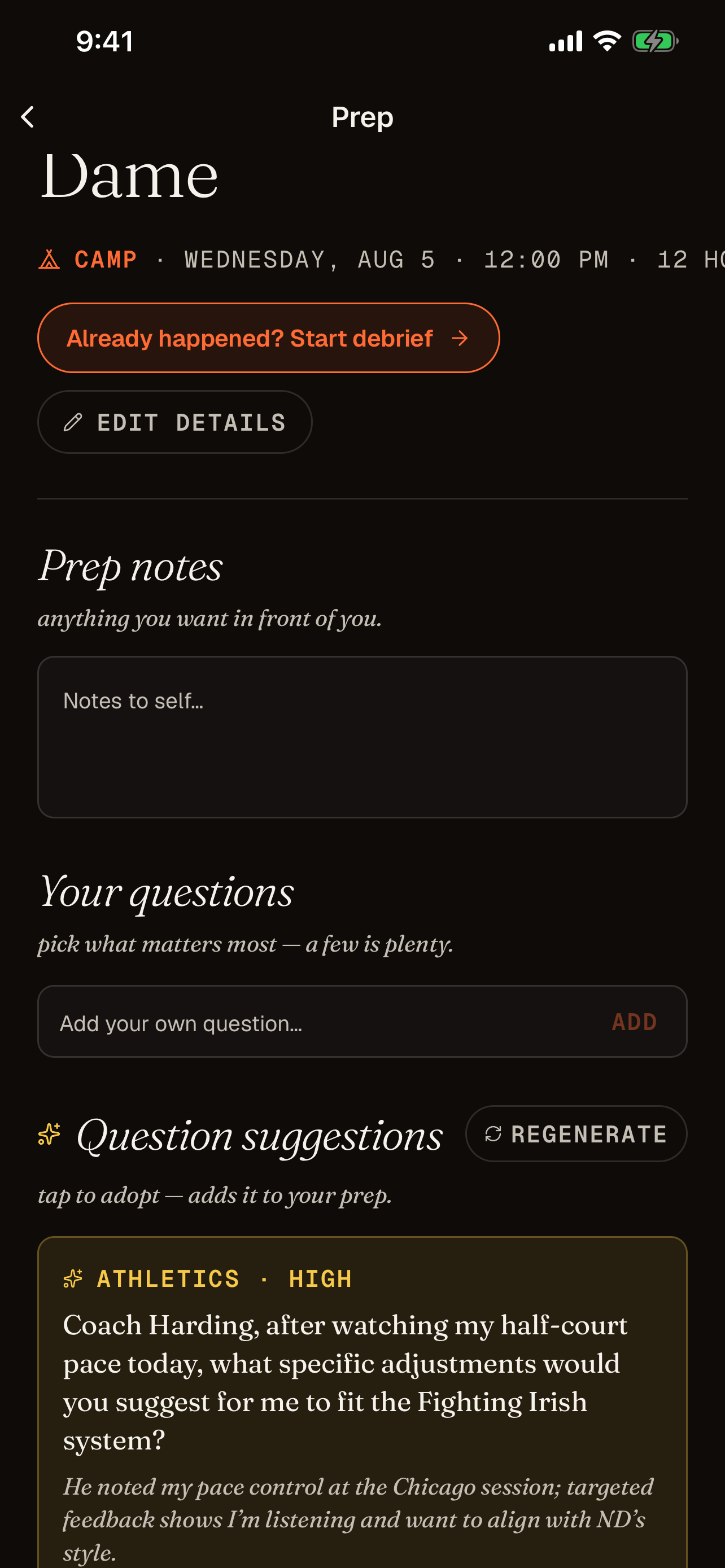
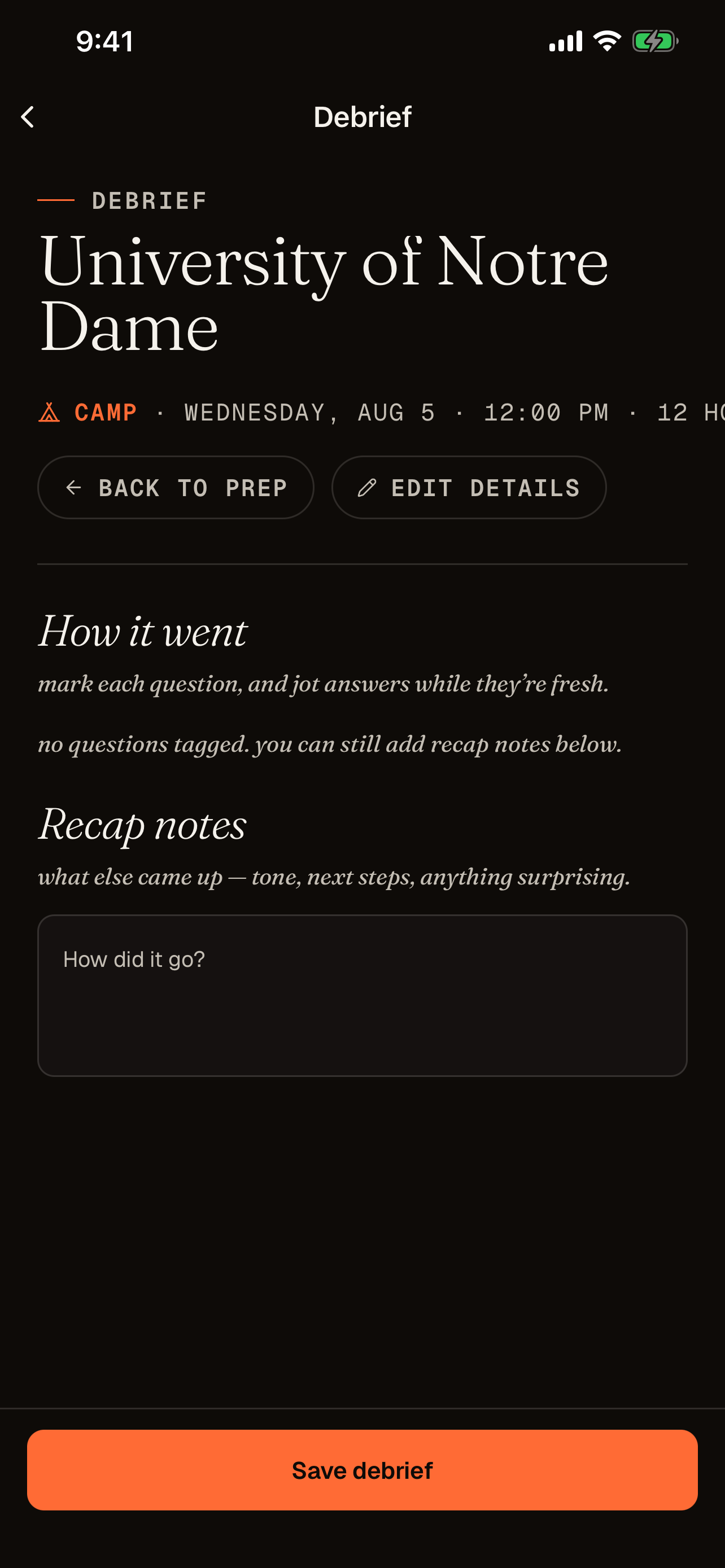
Most recruiting calls start with the athlete fumbling for what they wanted to ask. With Scouted, every call, camp, and visit gets a prep workspace. Your notes go in, your questions get tagged, and the app suggests follow-ups drawn from every conversation you've already had with that school. After it's over, the same screen turns into a debrief where you record what you learned.

Before · Prep
Scouted prep screen with question suggestions

Tag what you'll ask Your own questions, plus suggestions Scouted built from prior calls and emails with this school. Each one comes with a category, a priority, and the reason it surfaced. Tap "Bring it" to add.

After · Debrief
Scouted debrief screen

Capture what they said Mark each question asked or skipped, jot answers while they're fresh, and Scouted writes a one-line read on the conversation (warm, cool, neutral) plus the open items it caught.

Field Note № 04 · The Calendar

Know when they're
allowed to call.

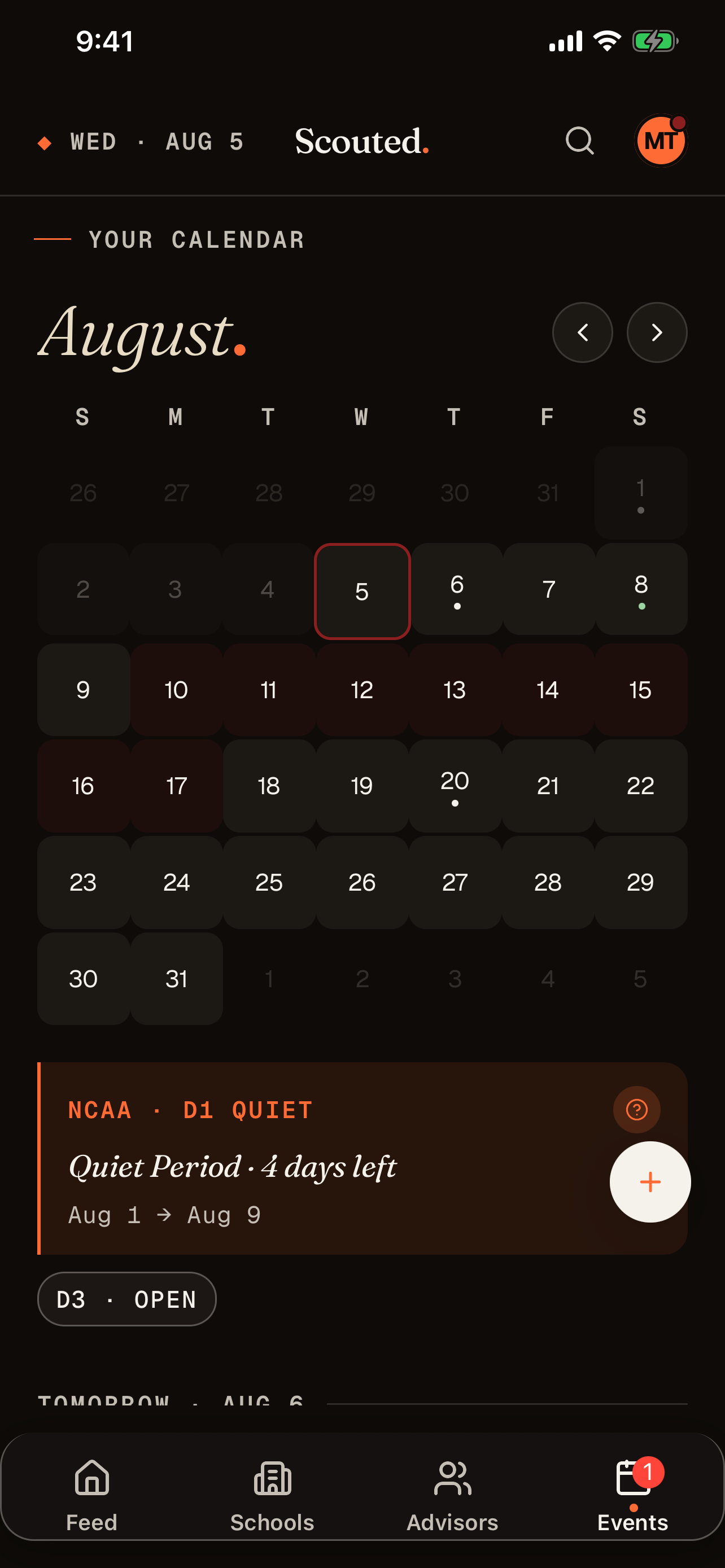
Every sport runs on a different NCAA clock, and the windows move every year. Scouted carries the 2026-27 calendar for your sport and division (dead, quiet, evaluation, and contact periods) and lays it over your own camps, visits, and follow-ups. No more reading a PDF to find out whether silence means anything.

Scouted calendar month view with NCAA recruiting period banner and daily agenda

Your month, banded Each day is tinted with the period that governs it, and your camps, visits, and follow-ups sit on top. The banner reads the window you're in and when it turns over.

Four windows, plain English
  • Contact period Coaches can call, text, email, and visit you off-campus.
  • Evaluation period Coaches can watch you play but cannot contact you off-campus.
  • Quiet period Contact happens on campus only.
  • Dead period No in-person contact allowed.
Worth knowing

You can contact coaches at any time. These rules only limit what they can do, so a dead period is the wrong time to go quiet.

D1 & D2 windows loaded D3, NAIA, and JUCO have no NCAA recruiting calendar, so Scouted shows them as open rather than inventing restrictions. Track schools across divisions and the app keeps a separate read on each.
Push · Recruiting period Contact period starts tomorrow D1 coaches can call and text starting tomorrow

Scouted alerts you when a window changes, so you don't need to remember to check the calendar.

Field Note № 05 · For Parents

One app.
Two views.
Zero group-chat chaos.

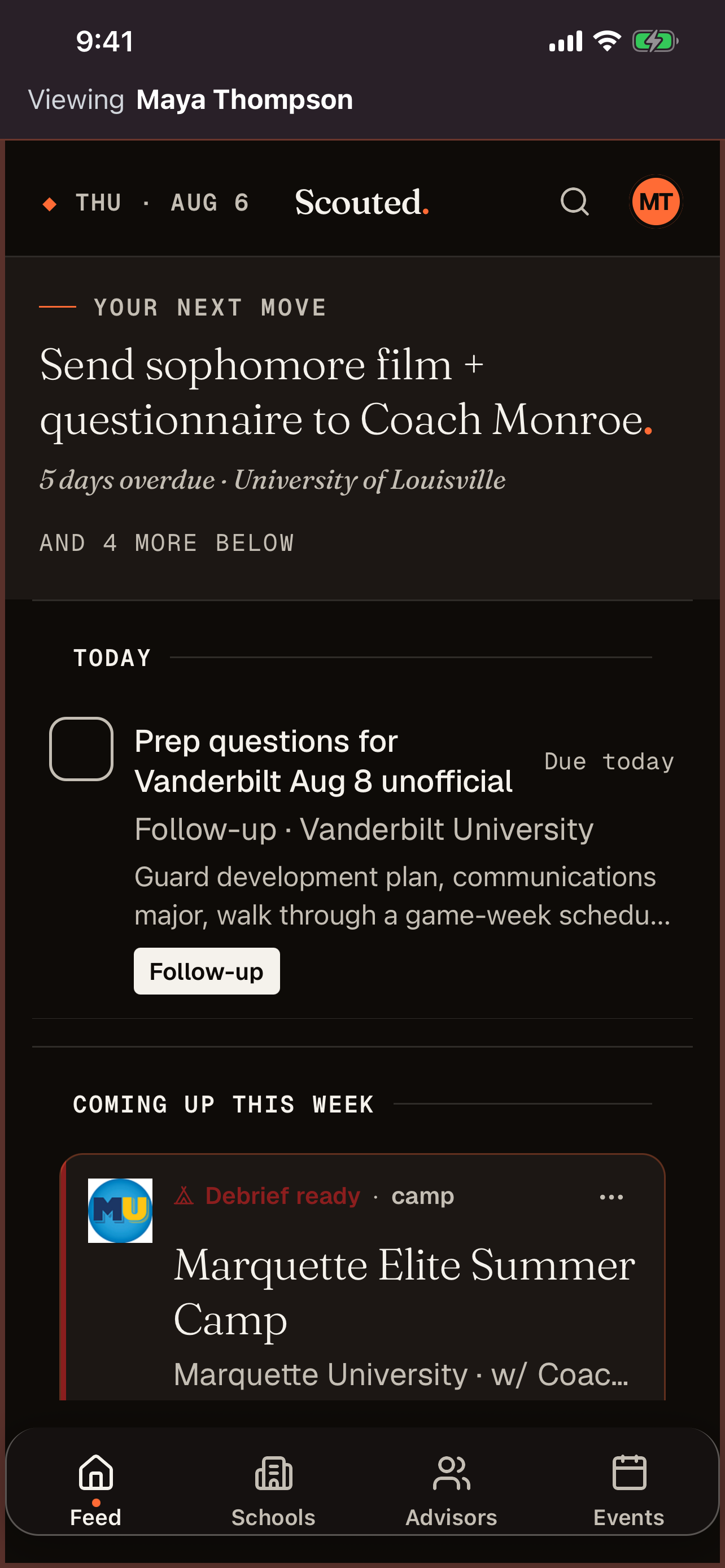
With Scouted Pro, your athlete runs the process and you get a quiet, read-only window into it. You see the same schools, coaches, and calendar on your phone. You can stop asking "did you hear back?" Family sharing is included with Pro at $4.99/mo or $49.99/yr, with a one-week free trial.

Athlete · Full access
Scouted athlete feed, full access

What they do Reply, log calls, plan visits, save film links, build a commitment case.

Parent · Read-only view
Scouted parent family-home view, read-only

What you see Every milestone, every coach, every visit, without being in their inbox.

№ 00 · A LETTER
From the founder A dad, a vacation text, and a '27 baseball kid
To the other adult in the passenger seat,

Scouted started on a family vacation.

We were somewhere on a family vacation when my son got a text from our recruiting advisor. He'd sent my son's video to a college coach, and the coach wanted to schedule a call.

It was the first of what we both hoped would be many recruiting moments. My second thought, after the high-five, was: how is he going to keep track of this?

My son is, like every kid his age, completely certain he can hold it all in his head. The names of the coaches. Who said what at which camp. When to follow up with whom. What film he sent and when. Every parent of a teenager knows how that sentence ends.

So my instinct was the same as everyone else's. I started thinking through a shared Google sheet. Maybe an Apple note. Some columns: school, coach, last contact, next step. The same thing every recruiting family builds, or tries to.

And then, being a software developer by day, I knew it wouldn't scale. A spreadsheet doesn't text him the morning of a camp deposit. A Notes doc doesn't notice when a coach has gone quiet. Neither helps much when the list grows from four schools to twenty.

What if, I thought, all of this lived in one place, and the place was smart enough to read the conversation back to him? "Hey, the coach mentioned a camp in that text. Want to add a reminder to sign up?" Or: "Here's a one-line read on where you stand with this program, refreshed every time something new happens." Or: "Here's the research on this school, so you can ask better questions on the call instead of doing it at 11 p.m. the night before."

That's the app I wished my son had. So I built it.

Families in every sport run into this. Every high school athlete trying to play at the next level, and every parent helping them get there, is fighting the same losing battle with sticky notes and browser tabs.

If any of that sounds like your family, I hope you'll download it and send the link down the hall.

— Matt Founder, Scouted · Recruiting dad, class of '27 baseball
Field Note № 06 · In the App

A tool that earns
a second open.

Built from the questions that came up at my kitchen table. If a feature didn't solve a Tuesday-night problem, it didn't get built.

№ 01Quick Add

Five-second log, from anywhere.

One sheet puts the four you use most up front: import a text, import an email, add a note, schedule a call. Five more sit behind "More options." You can also send items straight from Messages and Mail with the share sheet, without opening Scouted.

Import a text · a thread you already have›
Import an email · from your inbox›
More options · visits, camps, reminders✓
№ 02Mailbox

Every coach message, threaded by school.

Connect Outlook, paste in a thread, or forward an email to your own capture address, and it files to the right school. Each coach message lands in that school's conversation, in order, so you can find it later.

Wake Forest · Coach Whitmore2d
Duke · Coach ThompsonMon
Mailbox · synced 24m ago✓
№ 03Calendar

Camps, visits, and NCAA periods on one grid.

Every official visit, camp date, and follow-up reminder sits over the 2026-27 NCAA calendar for your sport and division. D1 and D2 windows are loaded. D3 shows as open, because it is.

Sep 11 · Vanderbilt OV4:00p
Sep 10 · Quiet period endsD1
Contact period · 31 daysNCAA
№ 04Research

A research snapshot, per school.

Each school has a Scouted-written program report covering academics, athletics, location, and culture. It refreshes when the team or roster changes and shows the date.

Wake Forest · last researched20w
Roster snapshot · 5 sections›
Program report · refreshable✓
№ 05Profile

The recruiting profile, copy-paste ready.

Position, GPA, test scores, NCAA ID, intended major. Every field your coach asks for, stored once, with a one-tap copy on each line.

GPA · spring '273.84
NCAA ID2704407007
PositionLHP
№ 06Advisors

Your team off the field, logged too.

Keep call notes on recruiting advisors, club coaches, and the parent of a kid who already committed, separate from your schools.

JP · Patterson Recruiting5 logs
3 in your corner›
Last touch · 8 days ago✓
Pricing

Two plans.
One difference.

The inbox, smart follow-ups, calendar, research, and export are free forever. Pro adds unlimited schools and a read-only parent view.

Scouted Standard

The recruiting organizer.

$0 / forever
  • Up to 4 schoolsTracked at a time. Enough for a short list.
  • Email & text importEvery coach message, threaded by school.
  • Smart summaries & follow-upsIncluded on every plan.
  • Calendar, research, profileEvent calendars, program reports, and your recruiting profile.
  • Data exportCSV, PDF, shareable link. Always yours.
No card required Download free
For recruiting families
Scouted Pro

The organizer + the parents’ seat.

$4.99 / month 1-week free trial
or $49.99 a year, about two months free
  • Unlimited schoolsFor when the list grows past four.
  • Family sharingRead-only parent view in the app, live, across devices.
  • Everything in StandardSame features, no school limit.
  • Priority supportFrom the founder.
  • Cancel anytimeYour data stays. You drop back to Standard.
Start free, upgrade inside the app Try Pro free
Every family starts on Standard. Upgrade inside the app when the short list grows, or when another adult in the house wants to stop asking "did you hear back?" See the full comparison →
Your move, Coach Mom & Coach Dad

Keep every school in one place.

Download Scouted and text the link to your athlete. The next coach email will have a place to go.

On a desktop? Scan the QR.